Short answer up front: this Alienware AW3423DWF review lands on a clear yes. Nearly four years after launch, the 34-inch QD-OLED ultrawide has quietly become one of the best value buys in PC gaming. Not because the panel got better, but because the price collapsed while the picture quality stayed genuinely excellent. If you can live without USB-C and 240Hz, it is still the smartest OLED ultrawide most people can buy in 2026.
Let’s get into why, and where it finally shows its age.
Verdict: the used-market and sale-price legend
The AW3423DWF is the monitor to beat on price-to-performance. The 3440x1440 QD-OLED panel delivers the perfect blacks, per-pixel contrast and hyper-saturated colour that made QD-OLED famous, and in day-to-day gaming it looks nearly indistinguishable from panels costing far more. What’s changed is the sticker.
Pros - Reference-grade contrast and colour for the money - Regularly discounted to well under $700 / £650 - 165Hz with near-instant OLED response - Excellent 3-year Alienware burn-in warranty - Understated design that fits any desk
Cons - No USB-C (a real omission in 2026) - First-gen QD-OLED, so modest HDR brightness and visible black raise in bright rooms - Only 165Hz next to newer 240Hz rivals - No KVM, basic USB hub
Check price: Alienware AW3423DWF (34-inch QD-OLED)
Price history: from $1,099 to under $700
When it launched, the AW3423DWF undercut the G-Sync AW3423DW at $1,099 and felt like a bargain. It kept falling. Through 2025 and into 2026 the Alienware AW3423DWF price has repeatedly hit new lows, with sale events dropping it into the $499-$696 band in the US and roughly £599-£649 in the UK.
Call it around $696 / £649 at typical street price, with deal-day dips notably lower. That is the entire argument for buying it in 2026: you are getting a monitor that reviewed as a $1,000+ flagship for the price of a mid-range panel. On the used market it drops further still, and the transferable burn-in warranty softens the usual second-hand risk.
Design, ports and that missing USB-C
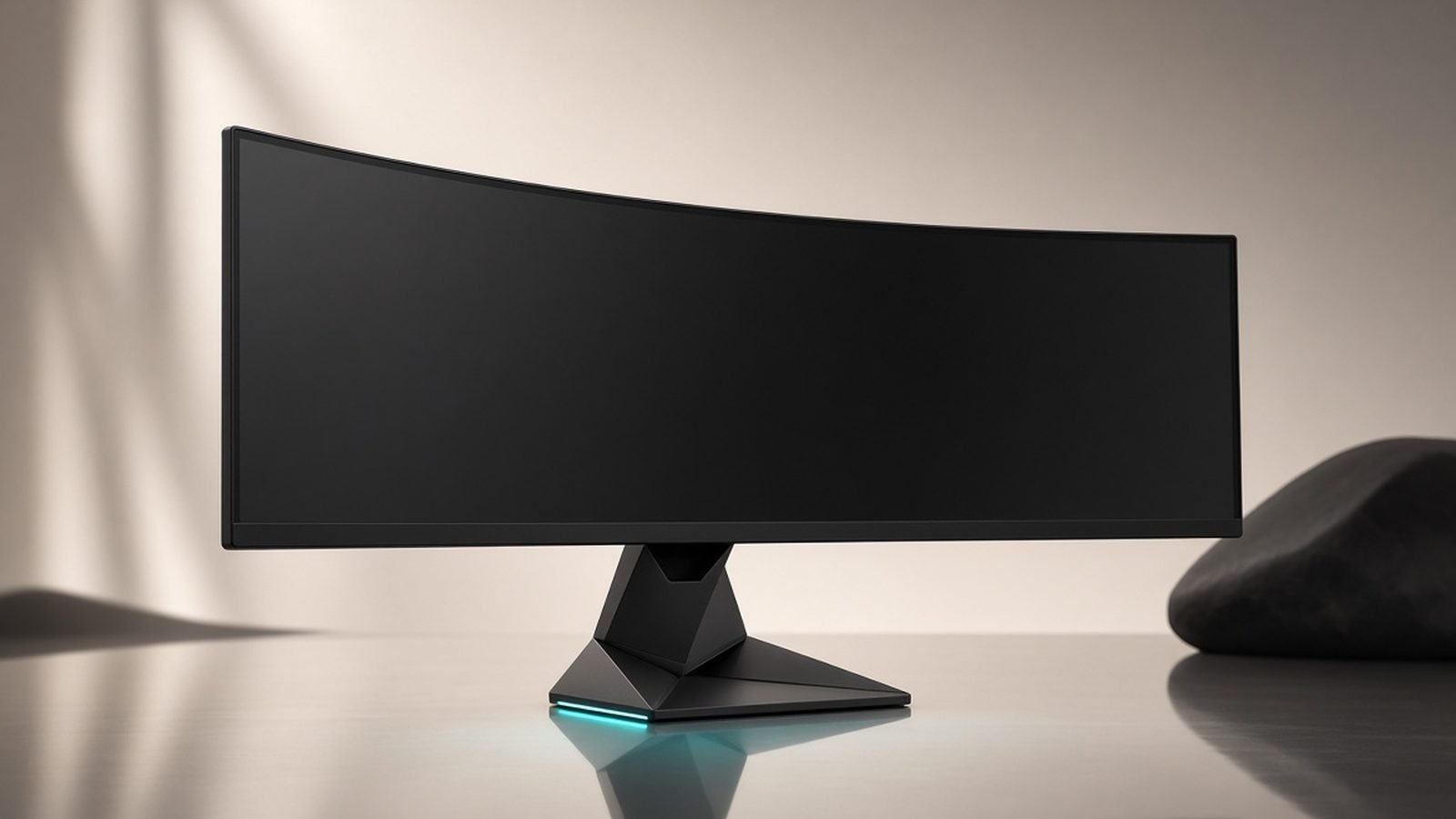
The build is classic later-era Alienware: clean, matte, with a slim hexagonal stand base and a small RGB ring on the back that you’ll forget exists. The 1800R curve is gentle and comfortable for both gaming and spreadsheets. VESA 100x100 mounting is there if you’d rather arm-mount it.
Ports are where the age shows. You get two HDMI 2.0 (not 2.1), one DisplayPort 1.4, a headphone jack, and a modest USB-A hub. There is no USB-C, so you can’t drive and charge a laptop over a single cable. HDMI 2.0 also caps console players: this is a PC monitor first, and at 3440x1440/165Hz that’s fine over DisplayPort, but it’s not a one-cable docking solution.
QD-OLED picture quality: gaming and movies
This is why the monitor still matters. In our research across owner communities and professional measurements, the AW3423DWF remains a standout alienware 34 QD-OLED review pick for image quality. Blacks are truly off, so space games, horror titles and letterboxed films look properly cinematic. QD-OLED’s colour volume means reds and greens pop in a way LCD simply can’t match.
For movies it’s superb in a dim room. The one caveat, common to first-gen QD-OLED, is that ambient light lifts the blacks toward dark grey, so a bright, sunny office slightly dulls the wow factor. In a controlled-light room it’s stunning.
On HDR: this is a 1st-gen panel, so peak brightness is modest (a few hundred nits in small highlights). For the best AW3423DWF HDR settings, use the “HDR Peak 1000” mode for games with strong highlights, keep Windows Auto HDR on for older titles, and calibrate the Windows HDR brightness slider rather than cranking in-game exposure. It won’t out-punch a mini-LED in daylight, but the contrast makes HDR feel far more impactful than the nit figure suggests.
165Hz performance and motion clarity
OLED’s near-instant pixel response is the headline here. Motion is crisp with essentially no smearing or ghosting, and 165Hz is plenty for the vast majority of players. FreeSync Premium Pro handles tearing, and it’s G-Sync Compatible in practice for Nvidia owners.
Is 165Hz “slow” in 2026? Only on paper. Competitive players chasing 240H-plus will feel the difference in fast shooters, but for everything else 165Hz OLED still looks and feels smoother than a 240Hz LCD, because there’s no pixel transition blur to fight. If you want the fundamentals of why that matters, see our Monitor Refresh Rate Explained: Is 144Hz or 240Hz Worth It? guide.
Burn-in after three years: what owners report
The big OLED question. Based on owner reports across long-term forum threads and Reddit, AW3423DWF burn-in is rare when you use the built-in protections. The panel runs pixel refresh cycles, pixel shifting and automatic logo/taskbar dimming, and the vast majority of three-year owners report no visible permanent image retention.
The cases that do surface almost always involve static content left at high brightness for very long sessions (a fixed HUD, a bright IDE, news tickers) without letting the maintenance cycles run. Practical advice: hide the taskbar, use a dark theme, enable screen dimming, and let the monitor run its refresh cycle when it asks. Critically, Alienware backs it with a 3-year warranty that explicitly covers burn-in, which is the single biggest reason to buy this panel over a cheaper OLED without that cover.
AW3423DWF vs newer 240Hz rivals (MSI 341CQPX, AW3425DW)
Two rivals matter in 2026. First, the MSI MPG 341CQPX: same-size QD-OLED but 240Hz with 98W USB-C, at around $749 / £799. For roughly $55 more in the US it’s a meaningful spec jump, and if USB-C or higher refresh is on your must-have list, it’s the smarter buy.
Second, on the aw3423dwf vs aw3425dw question: Alienware’s own AW3425DW is the natural successor, a newer 240Hz QD-OLED (with a brighter later-gen panel) at roughly $800. It’s better in almost every measurable way. But it costs meaningfully more, and the DWF’s price advantage is exactly the point.
| Monitor | Panel | Refresh | USB-C | HDR | Price (approx) |
|---|---|---|---|---|---|
| Alienware AW3423DWF | 34” QD-OLED (1st-gen) | 165Hz | No | DisplayHDR 400 True Black | ~$696 / £649 |
| MSI MPG 341CQPX | 34” QD-OLED | 240Hz | Yes (98W) | Peak 1000 | ~$749 / £799 |
| Alienware AW3425DW | 34” QD-OLED (newer gen) | 240Hz | No | Peak 1000 | ~$800 / £849 |
For sheer value, the DWF still wins. For future-proofing, the newer panels do. That’s the whole decision in one line.
Check price: MSI MPG 341CQPX (34-inch QD-OLED)
Who should buy it in 2026 (and who shouldn’t)
Buy it if you want the best QD-OLED ultrawide value on the market, you game mostly single-player or non-competitive, and you play in a room you can dim. You’re getting flagship image quality and the reassurance of a burn-in warranty for mid-range money. For a productivity-first workflow, it also earns a spot in our Best Ultrawide Monitors for Productivity 2026 roundup.
Skip it if you need USB-C laptop docking, you’re a competitive shooter player who genuinely benefits from 240Hz, or you work in a bright room where the raised blacks bother you. In those cases, spend up on the AW3425DW or MSI 341CQPX. On a tighter budget entirely, our Best Gaming Monitors Under $300 in 2026 (1440p Steals) guide has flat-panel picks instead.
Still the best QD-OLED ultrawide value in 2026? For most buyers, comfortably yes.
FAQ
Is the Alienware AW3423DWF still worth it in 2026? Yes, for most people. The panel is first-gen QD-OLED, but it still delivers near-flagship contrast and colour, and the price has fallen to around $696 / £649. Unless you specifically need USB-C or 240Hz, it remains the best value QD-OLED ultrawide you can buy, especially on a sale-day discount.
Does the AW3423DWF suffer from burn-in? Based on owner reports, permanent burn-in is uncommon when you use the built-in pixel-refresh and screen-dimming features. Static bright elements left on for long periods are the main risk. Importantly, Alienware includes a 3-year warranty covering burn-in, which meaningfully de-risks the purchase versus cheaper OLEDs.
AW3423DWF vs AW3425DW: which should I buy? The AW3425DW is the newer, brighter, 240Hz model and is better overall, at roughly $800. The AW3423DWF is 165Hz and first-gen but far cheaper. Buy the DWF for value and single-player gaming; buy the AW3425DW if you want higher refresh, more HDR punch and future-proofing.
What are the best HDR settings for the AW3423DWF? Enable HDR in Windows, use the monitor’s HDR Peak 1000 mode for high-highlight games, and turn on Auto HDR for older titles. Calibrate using the Windows HDR brightness slider rather than raising in-game exposure. It’s a modest-brightness panel, so its perfect blacks do most of the HDR heavy lifting.
Does the AW3423DWF have USB-C? No. It offers two HDMI 2.0, one DisplayPort 1.4 and a basic USB-A hub, but no USB-C for single-cable laptop power and display. If USB-C docking is essential, look at the MSI MPG 341CQPX instead, which includes 98W USB-C.
For more OLED and ultrawide coverage, visit our TVs & Displays.
Zen Tech Hub may earn a commission from links on this page, at no extra cost to you.