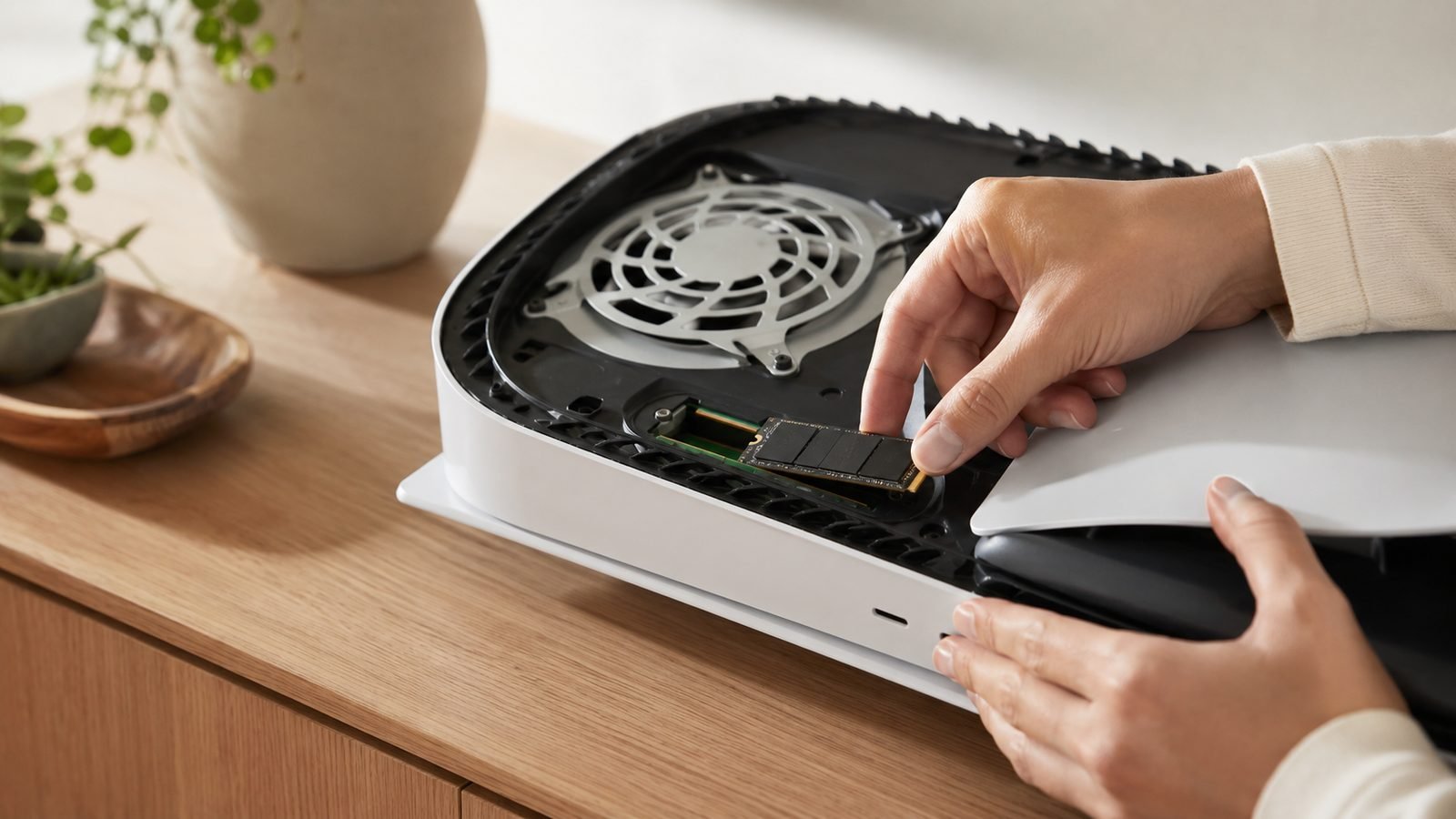
Modern games are enormous, and the “ps5 not enough storage” message hits fast — one Call of Duty install can swallow 250GB on its own. The good news: learning how to upgrade ps5 storage takes about ten minutes with a screwdriver, and it works identically on the original PS5, the PS5 Slim, and the PS5 Pro. This guide covers the exact SSD requirements Sony enforces, the best drives to buy right now (with fresh 2026 pricing), and a clean step-by-step install.
Update, 3 October 2026: all three heatsink drives now cost roughly double what this guide listed in July. The WD_Black SN850X 2TB heatsink model was $318.11 at Newegg (Tom’s Hardware’s tracker, 1 October), the Crucial T500 2TB heatsink $278.99 on Crucial.com and the Samsung 990 Pro 2TB heatsink $483.75 at Newegg, with Samsung’s own store at $669.99; UK from-prices on PriceSpy were £334.00, £323.99 (Crucial UK) and £334.07 respectively. The T500 is now the cheapest of the three in the US, so the SN850X’s value lead is thinner than it was. Our report on this week’s memory-driven price rises explains what is pushing component costs up.
One heads-up before you shop: SSD prices spiked hard during the 2026 memory shortage. Numbers below are current as of July 2026 — much higher than the bargain-bin figures older guides still quote.
PS5 SSD requirements: Gen4, 5,500MB/s, heatsink
Any drive you buy has to clear Sony’s bar or the console will reject it. There are three non-negotiable ps5 ssd requirements — heatsink included:
PCIe Gen4 M.2 NVMe, in the 2280 size (22mm wide, 80mm long). Gen3 drives are too slow; Gen5 works but you pay for speed the PS5 can’t use.
Sequential read of 5,500MB/s or faster. This is Sony’s official minimum. Drives a touch below it usually still work, but don’t gamble on a high-AOV purchase.
A heatsink. The PS5 slot runs hot, and an unshielded drive can thermal-throttle. Buy a model with a low-profile heatsink pre-fitted so it clears the cover — it’s the single most common install mistake.
Capacity is up to you. We recommend 2TB as the sweet spot in 2026: 1TB fills too quickly, and 4TB carries a steep price premium in the current market.
Best SSDs for PS5 right now (USD/GBP)
Here are the three drives we’d actually buy today. All are 2TB, Gen4, and ship with a heatsink that fits the PS5 bay. Prices checked 3 October 2026 (Newegg, Samsung.com US, Tom’s Hardware’s SSD deals tracker updated 1 October, Crucial.com US and UK, PriceSpy UK); expect them to drift.
| Drive | Best for | Rated read | Price (USD / GBP) |
|---|---|---|---|
| Samsung 990 Pro 2TB (Heatsink) | Fastest safe pick | ~7,450MB/s | $483.75 Newegg; $669.99 Samsung.com / from £334.07 |
| WD_Black SN850X 2TB (Heatsink) | Best value | ~7,300MB/s | $318.11 Newegg (1 Oct) / from £334.00 |
| Crucial T500 2TB (Heatsink) | Budget that still qualifies | ~7,400MB/s | $278.99 / £323.99 (Crucial.com) |
All three comfortably clear Sony’s 5,500MB/s floor. In real-world use the gap between them is invisible — the PS5’s storage controller is the bottleneck, not the drive. Pick on price and heatsink fit.
Samsung 990 Pro 2TB with Heatsink
The safe, premium choice. Samsung’s pre-fitted heatsink is low-profile and PS5-proven, and the 990 Pro has the longest track record of trouble-free installs based on owner reports across Reddit and retailer reviews. It’s the priciest of the three after the NAND price spike, but if you want zero drama, this is it.
Pros: Proven PS5 compatibility; slim factory heatsink; excellent sustained performance. Cons: Most expensive here; you’re partly paying for the brand.
Who it’s for: Anyone who wants the lowest-risk ps5 ssd installation and doesn’t mind paying a bit more.
Check price: Samsung 990 Pro 2TB with Heatsink
WD_Black SN850X 2TB with Heatsink
Our best-value pick and the one we’d steer most buyers toward. It’s fractionally slower than the 990 Pro on paper, which is irrelevant in practice — you will never feel the difference on a PS5. The heatsink version drops on sale often, sometimes dipping toward $150 even in this tight market.
Pros: Great price-to-performance; frequent discounts; reliable in owner reports. Cons: Heatsink is slightly chunkier than Samsung’s (still fits fine).
Who it’s for: The default buy for most people upgrading a best ssd for ps5 2026 shortlist.
Check price: WD_Black SN850X 2TB Heatsink
Crucial T500 2TB with Heatsink
The budget-friendly Gen4 that still clears Sony’s speed bar with room to spare. It’s the cheapest way to add a genuinely qualifying 2TB in 2026. Owner feedback is strong, though its heatsink availability comes and goes — check that the listing you buy includes one.
Pros: Lowest price of the three; comfortably meets requirements. Cons: Heatsink SKU can be harder to find; slightly less name recognition.
Who it’s for: Value hunters who want to spend the minimum without dropping below spec.
Check price: Crucial T500 2TB Heatsink
Step 1: Power down and remove the cover
Fully power down the PS5 — hold the power button until it beeps twice, then unplug everything. Never open the console while it’s in rest mode.
Lay the PS5 flat. Grip the top-right and bottom-left corners of the larger cover, lift gently, and slide it off. It comes away with a firm pop. Underneath you’ll see a small rectangular plate covering the expansion slot — that’s your target.
Step 2: Install the SSD and heatsink
Unscrew the single screw on the expansion slot cover and lift it off. Inside is a spacer/standoff screw and the slot itself.
Move the standoff to the notch matching your drive length (2280 for the drives above).
Angle the SSD into the connector at roughly 30 degrees, then press it flat.
Secure it with the small screw. Don’t overtighten.
If your heatsink is pre-fitted, you’re done. Peel any thermal pad film first if the instructions say so.
Refit the metal slot cover, then slide the main cover back on until it clicks. The whole ps5 ssd installation should take under ten minutes.
Step 3: Format and move games
Plug everything back in and power on. The PS5 detects the new drive and prompts you to format it — accept. Formatting is required and wipes the drive, so use a blank SSD.
Once formatted, head to Settings > Storage to move games over. You can install new titles straight to the M.2 drive and relocate existing PS5 and PS4 games from the console SSD. Set the M.2 drive as your default install location to keep the internal storage free. That’s the fix for the “ps5 not enough storage” wall for good.
PS5 Slim and PS5 Pro differences
The process is essentially identical across models. For the ps5 slim ssd upgrade, the expansion slot sits in the same place — you remove the same cover and the same slot plate. The Slim’s cover can feel slightly stiffer on first removal, so be patient rather than forceful.
The ps5 pro ssd install is also the same, and the Pro ships with more usable internal storage (around 2TB), but heavy libraries still fill it. Same Gen4 requirements, same heatsink rule, same steps. One drive type covers all three consoles — no model-specific SSD needed.
Troubleshooting: drive not recognised, slow speeds
Drive not recognised: Re-seat it. Nine times out of ten the SSD isn’t fully pressed into the connector or the securing screw is missing. Confirm it’s Gen4 M.2 2280, not a Gen3 or a physically longer 22110 drive.
“Slower than expected” warning at format: Usually a heatsink or contact issue, or a drive below the 5,500MB/s spec. The console still works but flags it. Verify your model against our requirements above.
Random ejections or errors mid-game: Almost always thermal — this is why the heatsink is mandatory. Make sure the pad is contacting the drive and nothing shifted during install.
If you’re building out a full streaming setup around your upgraded console, our guides on the Best Capture Cards for Streaming 2026: Console and PC Picks and How to Set Up a Capture Card for PS5, Xbox and Switch 2 pair well with a bigger drive. Controller nerds should also read DualSense Edge vs Xbox Elite Series 2: Best Pro Controller?. More at the Gaming.
Verdict
For most people, the WD_Black SN850X 2TB with Heatsink is the pick — it meets every requirement, installs cleanly, and costs less than the Samsung. Spend up for the Samsung 990 Pro if you want the most-proven, lowest-risk option, or save with the Crucial T500 if budget is tight. All three solve the storage problem for years.
FAQ
Do I really need a heatsink for a PS5 SSD? Yes. Sony’s own requirements call for cooling, and drives without a heatsink can overheat and throttle or eject mid-game. Buy a model with a low-profile heatsink pre-fitted so it clears the console cover. It’s cheap insurance and removes the most common cause of instability owners report.
Can I move games back to the PS5’s internal SSD later? Yes. In Settings > Storage you can freely move PS5 and PS4 games between the internal drive and your M.2 SSD as often as you like. Nothing is locked to one drive. Many owners keep current games on internal storage and park the rest on the expansion SSD.
Will a Gen5 SSD work in the PS5? Most Gen5 drives run fine because they’re backward-compatible with Gen4, but you gain nothing — the PS5’s slot tops out at Gen4 speeds. You’d pay a premium for headroom the console can’t use. Stick with a Gen4 drive that meets the 5,500MB/s minimum and put the savings toward capacity.
Does upgrading the SSD void my PS5 warranty? No. The M.2 expansion slot is designed to be user-accessible, and installing a drive there does not void your warranty. This is different from opening the console’s internal chassis. Just power down fully before you start and avoid forcing any covers.
How much storage do I actually need? We recommend 2TB in 2026. A single big-budget game can eat 150–250GB, so 1TB fills within a handful of installs. 4TB is available but carries a steep premium in the current memory market, making 2TB the clear value sweet spot for most players.
Zen Tech Hub may earn a commission from links on this page, at no extra cost to you.